


Skip to content
teamconms_cp

Telepo Cloud Phone

Business calling, collaboration, and mobility in one powerful cloud platform

A Cloud Communications Solution

Built For Modern Work

Today's customers expect seamless, effortless communication with businesses. 

At the same time, organisations need the flexibility to adapt to changing customer expectations, support hybrid workforces and manage communications efficiently across multiple locations and teams.

Telepo provides a flexible cloud communications platform that brings voice, messaging and collaboration together in a single solution.

By simplifying communications and integrating seamlessly with existing business systems, Telepo helps organisations deliver more connected customer experiences, improve employee productivity and create a foundation for future growth and innovation. 

careers page tile1


Better business with Telepo

businessman-on-mobile-web-shutterstock_2531383337
Mobility Centric
Telepo Mobile profiles provide a seamless experience whether your team are in the office, working remotely or on the go. They can make and receive calls through the Telepo app, with access to all the key features across their mobile, tablet and desktop devices.
Call Management
Call Management
Telepo makes it easy to stay connected with customers and colleagues. Features including auto attendants, hunt groups, call queues, and receptionist and contact centre consoles ensure calls are routed efficiently, helping customers reach the right person every time.
Cost Control
Cost Certainty
Move to a modern cloud phone solution without the cost and complexity of traditional systems. Telepo starts from $20 per user per month, including unlimited calling to New Zealand and Australia, with no hardware maintenance fees or large capital investment required.

Unified Communications Features

No Extra Hardware
Use Telepo on any device, anywhere.  Desk phones available if needed.

ConnectMe Web Softphone
Fast, secure access, integrated calls and chats, and omnichannel capabilities in a single interface.

Secure Anywhere Communication
Work securely from any device with reliable cloud-based communications.

Flexible Access
Stay connected from the office, home, or on the go with any internet connection.

Hunt Groups
Route calls to the right team quickly such as your sales, or support teams and improve answer rates.

Auto Attendants
Direct callers to the right person or department with a virtual receptionist.

User Profiles

Mobile Collaborators who need to stay connected across multiple devices, whether working remotely, travelling, or moving between locations.

Desk Based Power Users who are who rely on advanced calling and collaboration tools throughout the workday.

Collaboration Champions who work extensively in Microsoft Teams and need seamless communication and collaboration from anywhere.

Just Need Dial Tone for users who only need essential business telephony via a desk or cordless phone.



telepouser


Advanced Agent Features

Support
Built for customer-facing teams with advanced routing, CRM integrations, and reporting.

Future Scalability
Scale users and features up or down as your business evolves.

Flexible Access
Run over your existing internet connection, business broadband, or Managed Access for enhanced performance.

Call centre
Advanced inbound call handling for dedicated customer service teams.

Call queues
Queue callers until an agent is available, with custom hold music and messages.

Callbacks
Let callers keep their place in the queue and receive a callback when an agent is free.

User Profiles

Call Centre Agents who are handling high volumes of customer interactions, with access to advanced call handling, support, and reporting tools.

Customer Support Leaders who need visibility into performance, workflows, and service quality.



telepoadvanced

Side by side

See what features are included in each user profile

Unified Communications

$20 user/month

Advanced Agent

$40 user/month
Unlimited New Zealand and Australian calling
NZ Landline number (AU available as an add-on)
Call management features
Self Management Portal
Advanced Call Analytics and PowerBI Integration
Microsoft Teams Integration
Unlimited Ring Groups
Dial By Extension
Azure AD & Google SSO Support
Instant messaging and presence
Audio Conferencing Add-on
O365 Calendar and Contact Integration
Ad Hoc Call Recording
Local NZ Phone and Online Support
Full Time Call Recording Add-on
Call Centre Agent Profile
Call Centre Supervisor Profile
Wall boards
Advanced Queuing Functions
Open APIs & Webhooks
Call Recording extended storage/100GB Add-on Add-on
Terms & Conditions:  All rates shown are GST exclusive. Included calling is subject to our fair use policy. Digital Island General Terms apply.  
Add-On Features

Microsoft Teams

Microsoft Teams Cloud Calling

Telepo Teams Integration seamlessly combines the robust call flows and redundancy of the Telepo platform with your Office 365 Microsoft Teams tenancy. This integration ensures that Telepo provides the core phone system routing and desk phone reliability for some users, while delivering calls directly into the Teams interface that your users engage with daily.

With this setup, you can leverage Telepo's advanced features, including Contact Centre Agents, Call Recording, CRM Integration, Advanced Call Reporting, Complex Call Flows, and Disaster Recovery/Business Continuity Planning (DR/BCP) options, all while maintaining reliable core telephony.

Talk to our team about the options and pricing. 
telepomsteams


Call Recording

Capture Valuable Customer Interactions 

  • Record inbound and outbound calls automatically
  • Minimize liability risk and ensure regulatory compliance
  • Easy resolution to customer disputes
  • Improve customer strategy by identifying trends taking place within your business
  • Increase revenues by promoting strong sales techniques
  • Flexible cloud based recording storage
  • Securely access call recordings via Cloud based portal

Talk to our team about the options and pricing. 
telepocallrecord


Analytics

Unified Analytics

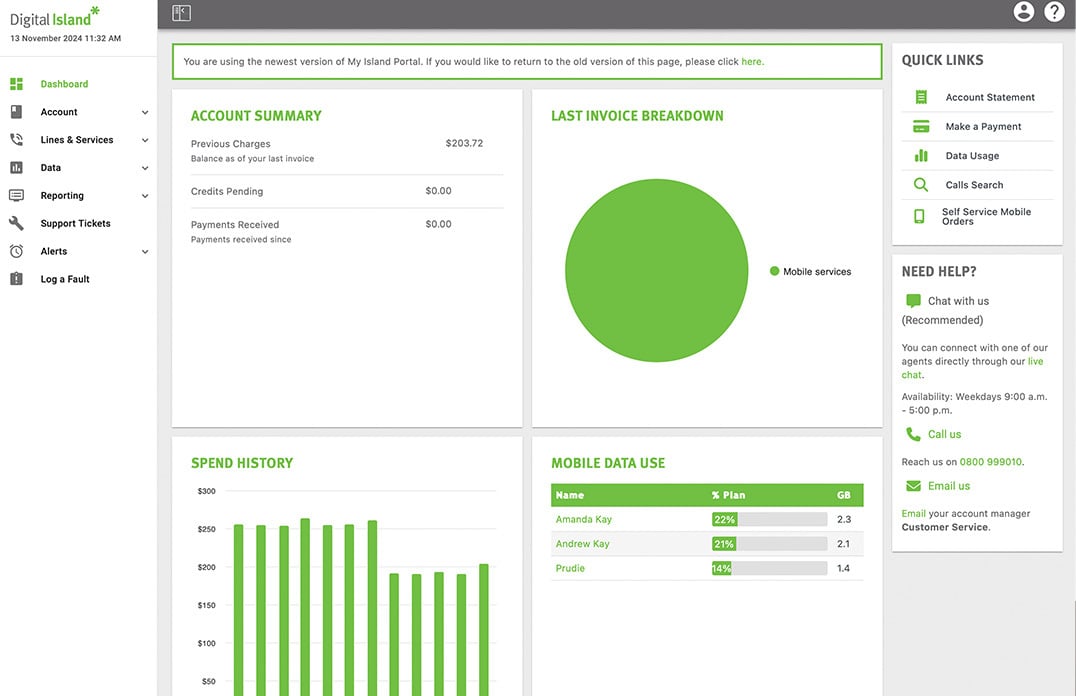
Our analytics platform collects and integrates data from both the Telepo and Microsoft Teams platforms, offering a single, cohesive view of all interactions. This means that you can understand the internal and external communications more effectively

Real-Time and Historical Insights

The platform excels in both real-time and historical data collection, providing a 360-degree view of customer communication. This enables you to make informed, data-driven decisions.

Talk to our team about the options and pricing. 
telepodash


Extended Support

Support hours that work with your business

Our Extended Support agreement means that our team are made available to you when your business need us outside of our standard support hours.

This means that you can relax knowing that you will receive the same level of support and assistance whenever you need it.

Talk to our team about the options and pricing. 

teleposupport


Integrations

Microsoft

Integrations to Microsoft Teams and 365 Calendar ensure that no matter where you are making and taking calls, your status and call routing will move with you. With the connectivity of Power Bi ensuring that those calls are easily surfaced in your systems.

API and web-hooks

Telepo's open API stack allow you to build capability and integration between the Telepo platform and your own or 3rd party systems. When combined with the web-hook push for user actions, the platform allows for any number of actions to be controlled or activated as required.

Talk to our team about the options and pricing. 

telpointegration

FAQs

How secure is Telepo Cloud PBX? Telepo is very secure, it uses TLS Encryption to communicate with our dedicated voice servers which in turn, are protected by industry best practice security standards and practices.
What do I need to run Telepo? Telepo requires fibre internet access and good cabling to be in place in your office.  
How long does it take to install Telepo?

Typically, Telepo is up and running 3-4 weeks from order.  


What happens after you place an order? 
  1. Within one business day of your order one of our project managers will be in touch with you by phone and email.

  2. From there we’ll check the setup with you, get any additional details we need and discuss the best time to the do the change over.

  3. A Digital Island tech will then visit on the day and run through the installation and train your staff.

  4. Your site will then go live and your Digital Island account manager will then be available to assist as required.

What information do I need to provide to get started?
  1. Find all your existing agreements  with your PBX vendor and the various suppliers you might have for your phones lines and internet.
  2. Check that you are out of contract and ready to move.  Its also useful to have theses to make sure we fully replicate and then improve the services you need to run your business.
  3. Do a count of the number of phones/sites you have and note any special requirements, such as night bells, cordless phones etc
  4. Have a quick chat to the staff who answer the main number and make a note of any special requirements and especially “nice to haves” as Telepo supports some 500 additional features to make making and receiving calls simple.
  5. It might be helpful to draw a basic diagram of your current set up. 
  6. Check that you have a Fibre/UFB internet connection. 
Are there any privacy issues with recording customer calls?

New Zealand is generally considered a one-party consent jurisdiction. This means that if your business is a participant in the call, recording it is generally lawful. You do not necessarily need the customer's explicit consent before recording.  However, if you're recording calls on behalf of a business, the Privacy Act 2020 applies. Even if the recording itself is lawful, you must handle the recordings appropriately as personal information.  Best practice is to:

  • Inform callers that calls may be recorded.

  • Explain the purpose (e.g. quality assurance, training, compliance, dispute resolution).

  • Securely store recordings.

  • Limit access to authorised staff.

  • Retain recordings only for as long as necessary.

  • Have a process for responding to customer requests regarding their personal information.

This is why many organisations use announcements such as:  "This call may be recorded for quality assurance and training purposes."

While not always legally required, it is generally considered good privacy practice and demonstrates transparency with customers.

Looking to move your business to a modern cloud phone system?

Talk to one of our expert team today.